
Security
Keycard's security model, encryption, and data protection
Keycard is built on security-first principles, providing defense-in-depth protection for sensitive credentials and authentication data.
Security Principles
Section titled “Security Principles”Zero Credential Storage
Section titled “Zero Credential Storage”Your applications never handle or store user credentials:
| User Authentication | Users authenticate directly with their identity provider (Okta, Google, etc.) |
| Authorization Grants | Keycard receives authorization grants, not passwords |
| Time-Limited Tokens | Applications receive time-limited access tokens, not long-lived credentials |
| Encryption | All sensitive data is encrypted at rest and in transit |
Least Privilege Access
Section titled “Least Privilege Access”Applications only receive tokens for explicitly declared dependencies:
| Dependency Declaration | Applications must pre-declare required resources |
| Scope Minimization | Request only the minimum scopes needed |
| User Consent | Users authorize each application-resource pairing |
| Time-Limited Tokens | Tokens expire and require refresh |
Defense in Depth
Section titled “Defense in Depth”Multiple layers of security protection:
| Network Layer | TLS 1.2+ for all communications |
| Application Layer | OAuth 2.0 authorization checks |
| Data Layer | Envelope encryption with per-zone keys |
| Audit Layer | Comprehensive logging of all security events |
Credential Isolation
Section titled “Credential Isolation”Each zone maintains independent credentials:
| Per-Zone Encryption | Separate encryption keys per zone |
| User Isolation | User credentials scoped to specific zones |
| No Cross-Zone Access | Tokens from Zone A cannot access Zone B resources |
| Independent Audit | Separate audit logs per zone |
Comprehensive Audit Trail
Section titled “Comprehensive Audit Trail”Every security event is logged and traceable:
- User authentication attempts
- Token issuance and exchange
- Resource access requests
- Administrative configuration changes
- Encryption key operations
Data Encryption
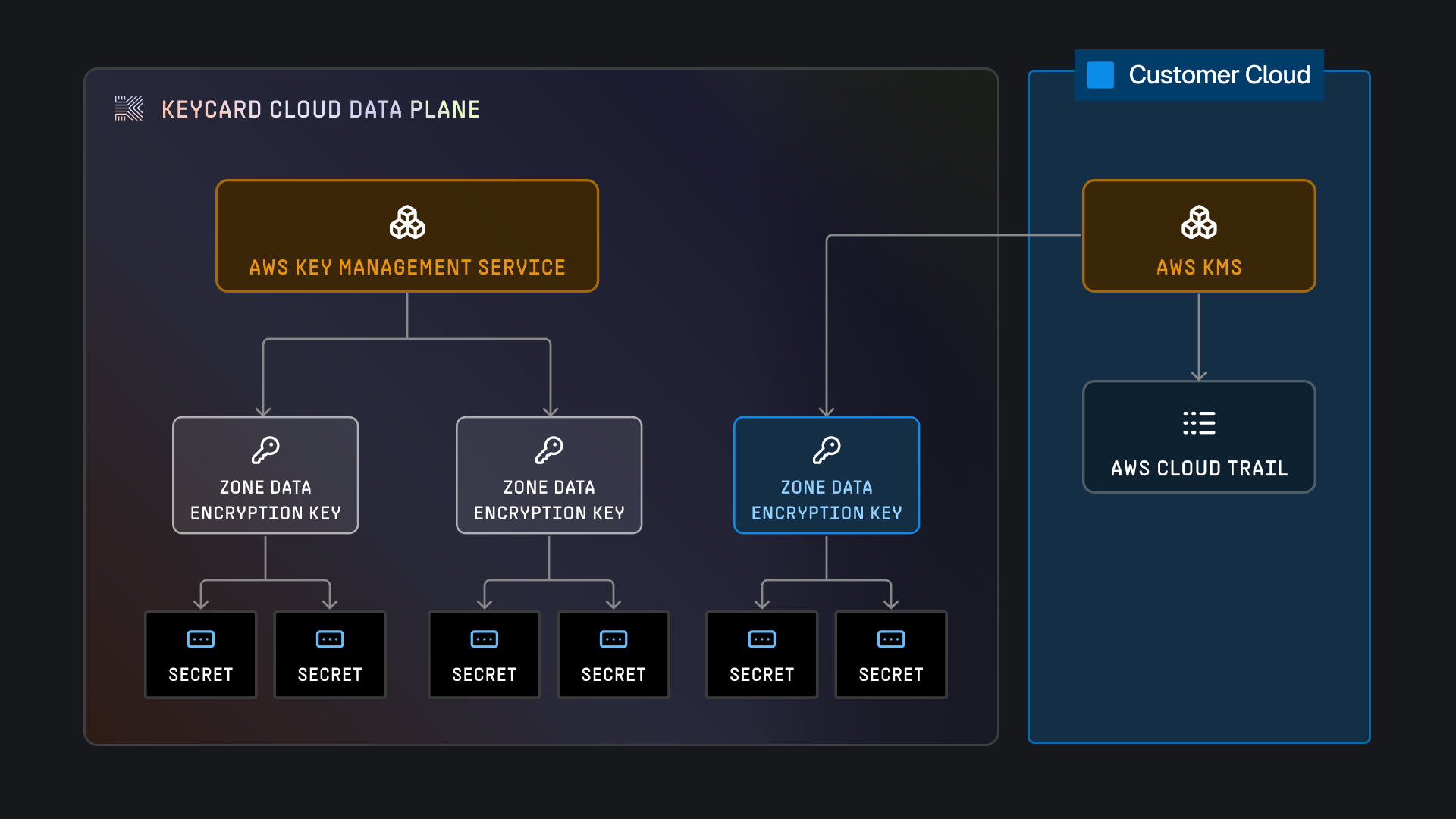
Section titled “Data Encryption”Keycard stores encrypted data using envelope encryption. The Key Encryption Key (KEK) is managed by AWS (through KMS) and used to create a Data Encryption Key (DEK). As per the Keycard Cloud reference architecture, for each dataplane, we have a dedicated KEK.
Whenever you create a zone in the Keycard platform, we create a dedicated DEK. This DEK will be securely stored, encrypted through the KEK. Any secret materials that are associated with the zone will be encrypted with the DEK, using the ChaCha20 algorithm.
Envelope Encryption Model
Section titled “Envelope Encryption Model”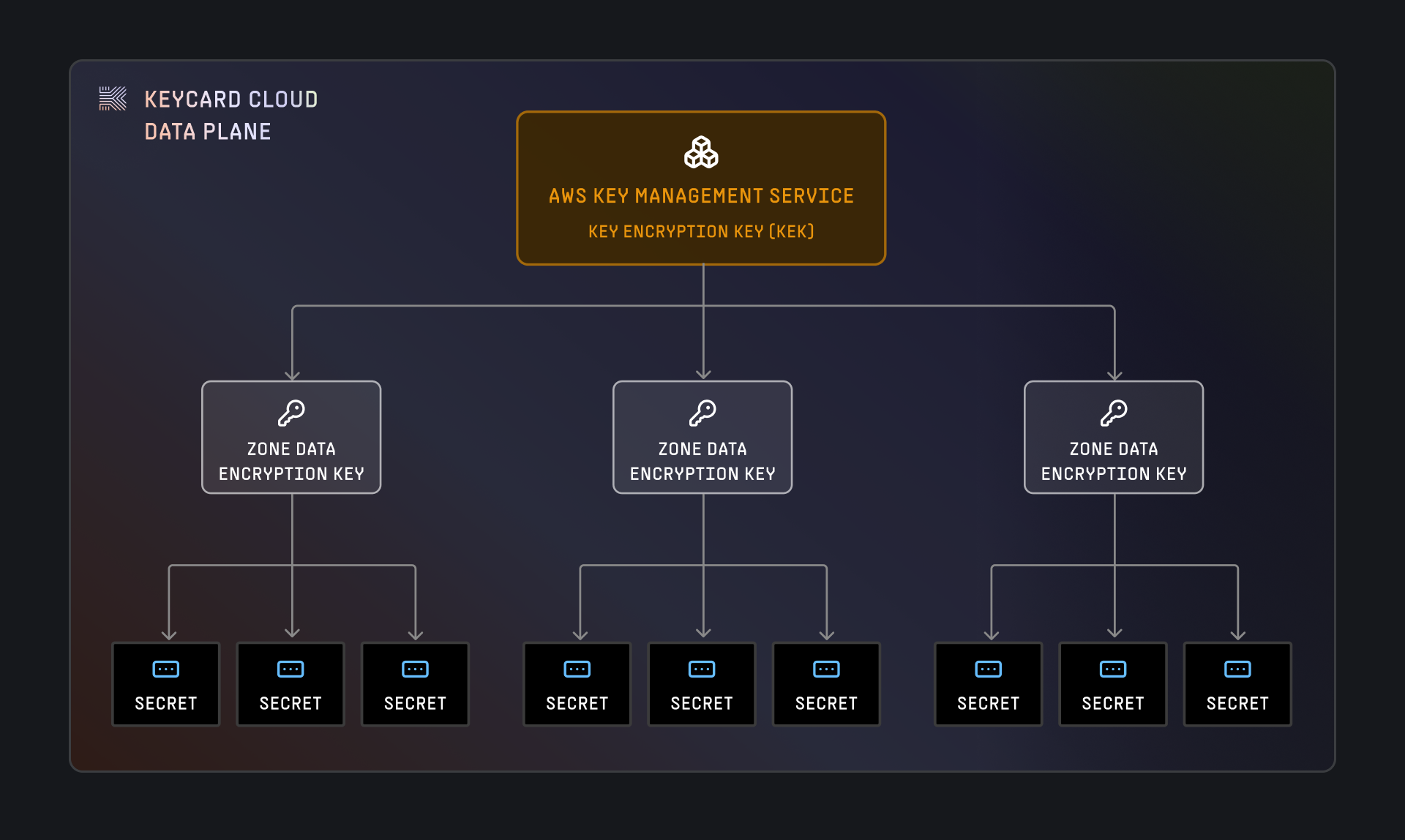
How It Works
Section titled “How It Works”-
KEK (Key Encryption Key)
- Managed by AWS KMS
- One KEK per Keycard data plane (unless CMEK)
- Never leaves AWS KMS
- Used to encrypt/decrypt DEKs only
-
DEK (Data Encryption Key)
- Created when a zone is provisioned
- Encrypted with the KEK and stored in Keycard’s database
- Cached in memory for performance (15 minutes, 10,000 operations max)
- Used to encrypt/decrypt actual secret materials
-
Secret Materials
- Encrypted with the zone’s DEK using ChaCha20 algorithm
- Stored in Keycard’s secure database
- Decrypted on-demand when needed by applications
Secret Material Types
Section titled “Secret Material Types”Keycard encrypts and protects several types of sensitive data:
| Material Type | Description | Example |
|---|---|---|
| OAuth Tokens | Access and refresh tokens from external providers | GitHub access token for user’s repositories |
| Static Credentials | Customer-provided secrets for non-OAuth resources | Database passwords, API keys |
| Signing Keys | Per-zone private keys for JWT signing | Zone’s ECDSA private key for token signatures |
| Provider Secrets | OAuth client secrets for provider integrations | Google OAuth app client secret |
Customer Managed Encryption Keys (CMEK)
Section titled “Customer Managed Encryption Keys (CMEK)”Keycard provides the functionality for customers to provide their own Customer Managed Encryption Key (CMEK). CMEK is configured on a per zone basis and follows the same pattern as the standard Keycard Cloud envelope encryption, but uses the customer provided encryption key to encrypt the data encryption key. The customer’s provided KMS Instance will be used to encrypt and decrypt the data encryption key, which in turn will be used to encrypt and decrypt secret materials.
CMEK provides customers with cryptographic control over their data. Customers control the permissions for Keycard to access their KMS instance, and can revoke access at any time. When access is revoked, Keycard will not be able to decrypt any stored data.
What is CMEK?
Section titled “What is CMEK?”CMEK allows you to provide your own AWS KMS key instead of using Keycard’s managed KEK:
- Your KMS Key: You create and manage the KMS key in your AWS account that acts as your Key Encryption Key.
- Your Permissions: You control who can use the key via IAM and KMS policies
- Your Control: Revoke access at any time to make data unreadable
Architecture
Section titled “Architecture”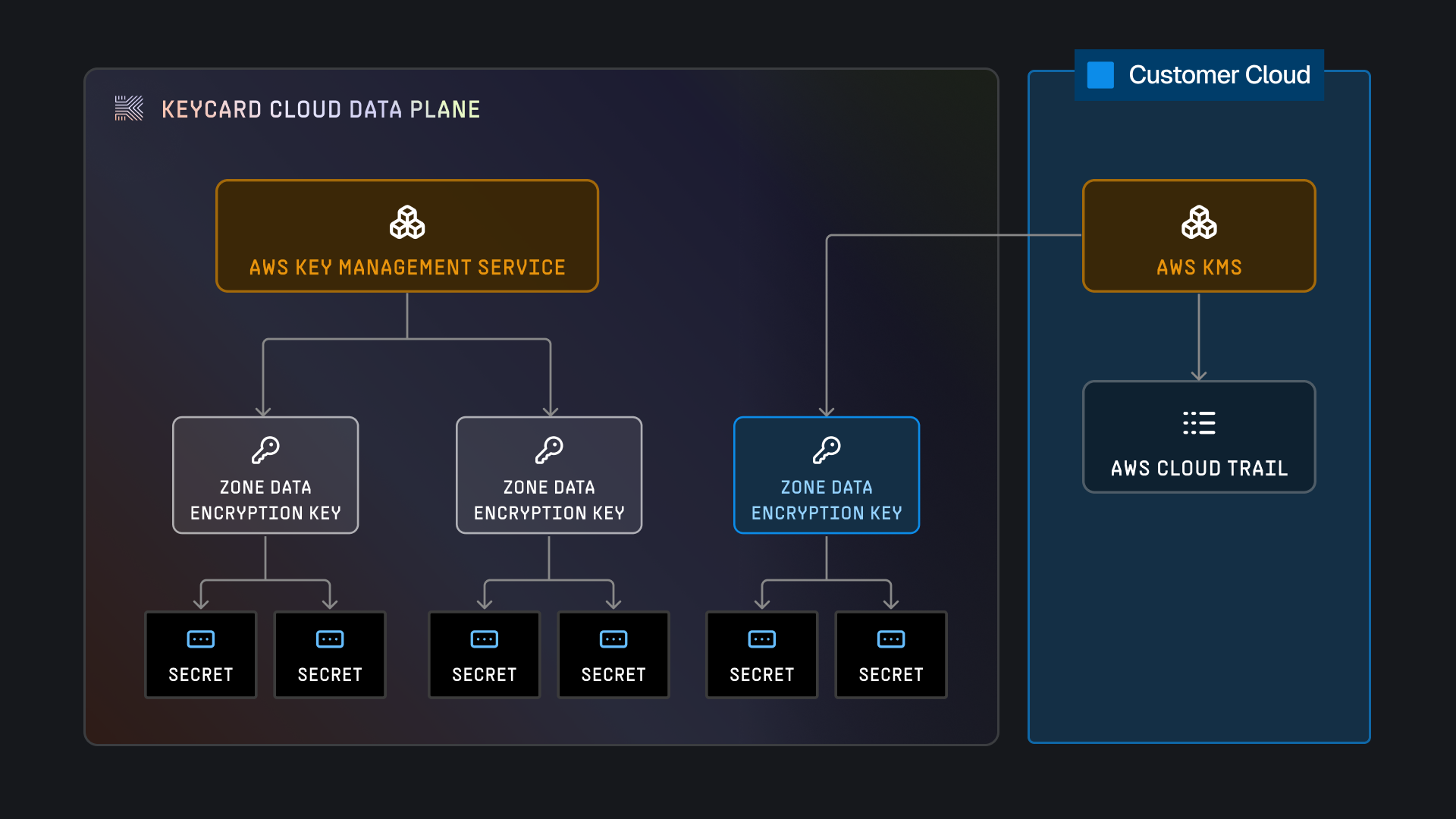
CMEK Configuration
Section titled “CMEK Configuration”CMEK is configured per zone:
- Create a KMS key in your AWS account
- Configure the key policy to grant Keycard access (see below)
- Register the KMS key ARN with your Keycard zone
- All secret materials for that zone use your KMS key
Benefits
Section titled “Benefits”- Cryptographic Control: You own the root encryption key
- Revocation: Disable the key to make data unreadable instantly
- Compliance: Meet regulatory requirements for key management
- Audit Trail: AWS CloudTrail logs all KMS operations
- Key Rotation: Control your own key rotation schedule
AWS KMS Permissions
Section titled “AWS KMS Permissions”Keycard requires minimal KMS permissions:
{ "Version": "2012-10-17", "Statement": [ { "Sid": "Allow admin access to the key", "Effect": "Allow", "Action": "kms:*", "Principal": { "AWS": "arn:aws:iam::<YOUR_AWS_ACCOUNT_ID>:root" }, "Resource": "*" }, { "Sid": "Allow describing the key", "Effect": "Allow", "Action": "kms:DescribeKey", "Principal": "*", "Resource": "*", "Condition": { "ForAnyValue:StringLike": { "aws:PrincipalOrgPaths": [ "o-c7hznpvsin/r-6n6x/ou-6n6x-bcvsfrlg/ou-6n6x-oox2udyt/*" ] } } }, { "Sid": "Allow access for the Keycard OU and its descendants", "Effect": "Allow", "Action": ["kms:Encrypt", "kms:Decrypt"], "Principal": "*", "Resource": "*", "Condition": { "StringEquals": { "kms:EncryptionContext:keycardOrganizationID": "<YOUR_KEYCARD_ORGANIZATION_ID>" }, "ForAnyValue:StringLike": { "aws:PrincipalOrgPaths": [ "o-c7hznpvsin/r-6n6x/ou-6n6x-bcvsfrlg/ou-6n6x-oox2udyt/*" ] } } } ]}Encryption Context
Section titled “Encryption Context”Every KMS operation includes encryption context for auditability and verification:
{ "KeycardZoneId": "z-abc123def456", "KeycardOrgId": "org-xyz789", "KeycardKeyId": "dek-unique-id-12345"}This allows you to:
- Correlate Keycard audit logs with AWS CloudTrail events
- Restrict KMS usage to specific zones via policy conditions
- Track which data encryption keys are being used
Revocation
Section titled “Revocation”To revoke Keycard’s access to your data:
- Disable the KMS key in your AWS account, or
- Remove Keycard’s permissions from the KMS key policy
Result: Keycard cannot decrypt any secret materials for that zone. All operations requiring secrets will fail until access is restored.
Private Connectivity
Section titled “Private Connectivity”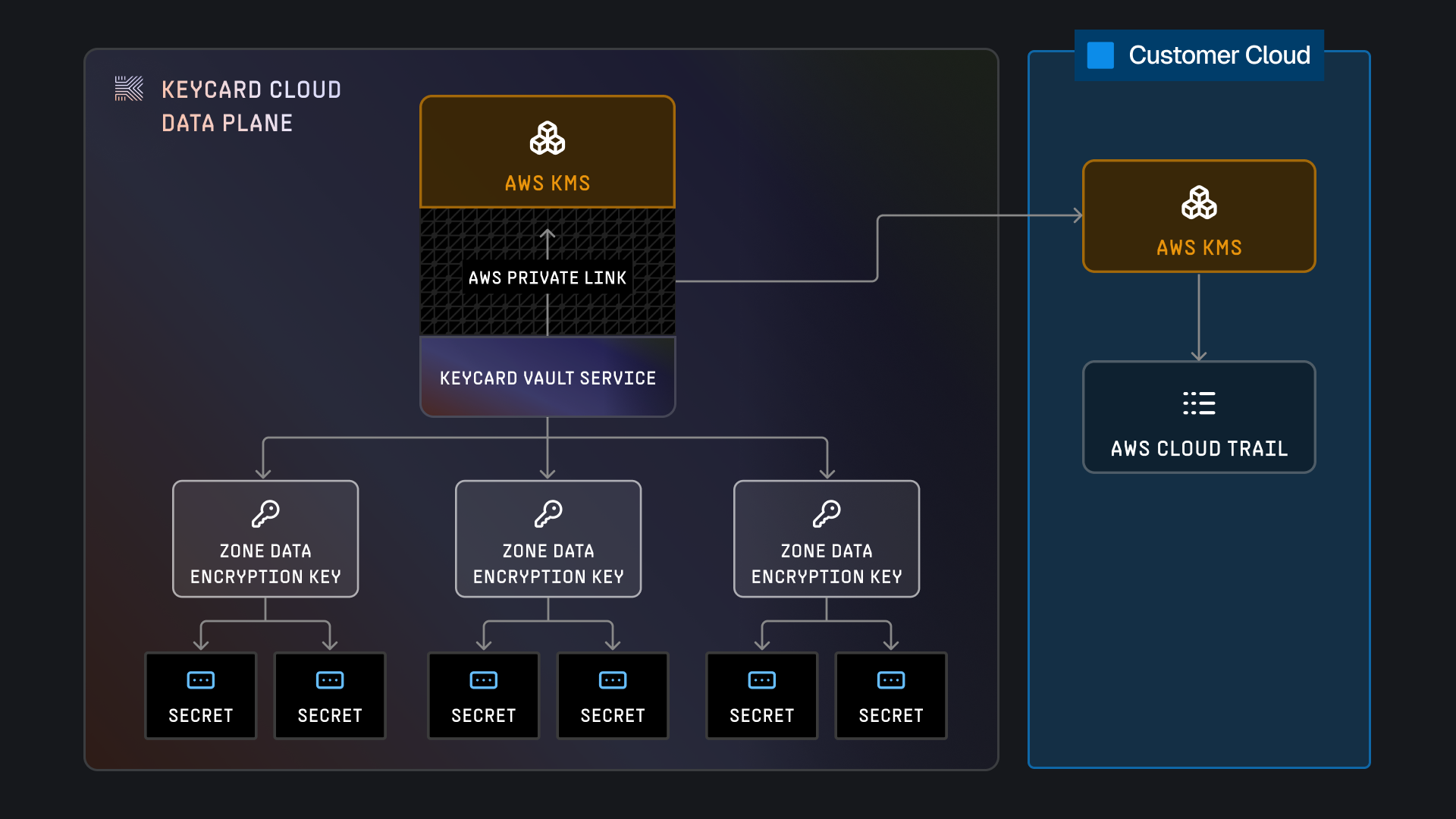
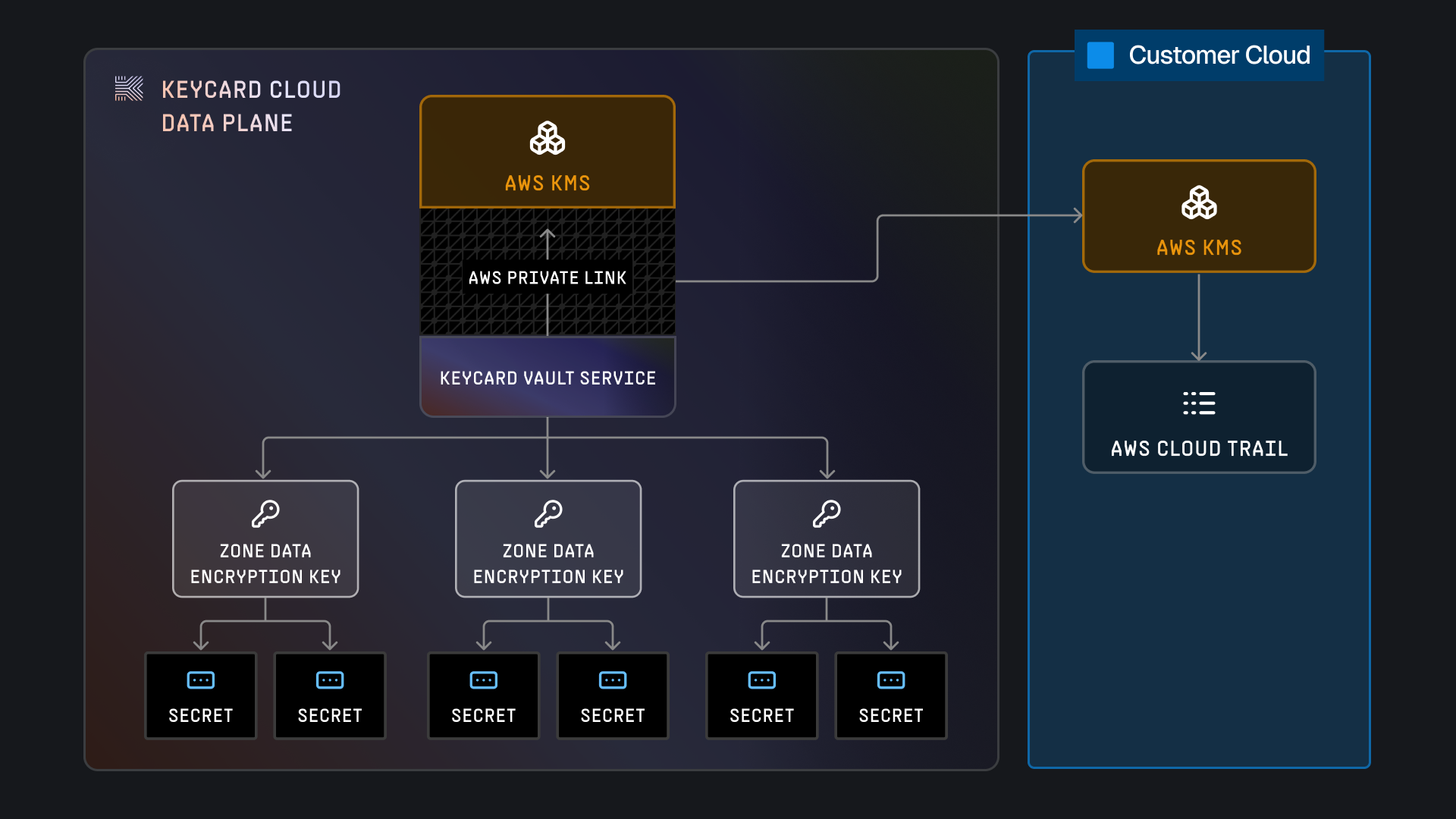
Keycard uses AWS PrivateLink to connect to AWS KMS, meaning that communication between Keycard’s VPCs and AWS KMS is conducted entirely within the AWS Network. The AWS VPC PrivateLink configuration is managed entirely by Keycard and transparent to customers.
PrivateLink for KMS
Section titled “PrivateLink for KMS”All communication between Keycard’s infrastructure and AWS KMS occurs over AWS PrivateLink:
- No Public Internet: Traffic never leaves AWS’s private network backbone
- Reduced Attack Surface: No exposure to internet-based threats
- Transparent to Customers: Automatically configured by Keycard
- Low Latency: Direct connectivity within AWS infrastructure
PrivateLink for Enterprise Cloud
Section titled “PrivateLink for Enterprise Cloud”Enterprise Cloud customers can establish PrivateLink connections to their dedicated cell:
- Unidirectional: From your VPC to Keycard only
- No Ingress: Keycard cannot initiate connections to your network
- IP Allowlisting: Optionally restrict to specific CIDR blocks
- VPC Endpoint: Connect without internet gateway or NAT
Learn more about Enterprise Cloud deployment →
Token Security
Section titled “Token Security”Token Types
Section titled “Token Types”Keycard issues and manages multiple token types:
| Token Type | Purpose | Lifetime | Refresh |
|---|---|---|---|
| Access Token | Application authorization | 1 hour | Via refresh token |
| Refresh Token | Obtain new access tokens | 30 days | Rotated on use |
| ID Token | User identity information | 1 hour | N/A (identity only) |
| Exchanged Token | Resource-specific access | 1 hour | Via refresh of parent token |
Token Protection
Section titled “Token Protection”- TLS 1.3: All token transmission encrypted
- Short Lifetimes: Access tokens expire quickly (1 hour)
- Rotation: Refresh tokens rotate on each use
- Binding: Tokens bound to specific clients via PKCE
- Revocation: Instant token revocation via Keycard APIs
Token Validation
Section titled “Token Validation”Applications validate tokens using:
-
JWKS Endpoint: Retrieve zone’s public signing keys
https://z-<zone-id>.keycard.cloud/.well-known/jwks.json -
Standard JWT Validation:
- Verify signature with public key
- Check
iss(issuer) matches zone - Check
aud(audience) matches application - Check
exp(expiration) is valid - Validate required claims
-
Scope Verification:
- Check
scopeclaim contains required scopes - Enforce least-privilege access
- Check
Local Cache
Section titled “Local Cache”For performance and cost optimization, Keycard caches decrypted data encryption keys (DEKs) in memory.
Cache Policy
Section titled “Cache Policy”- Duration: 15 minutes maximum
- Operation Limit: 10,000 cryptographic operations per cached key
- Automatic Refresh: Cache refreshes automatically when limits are reached
- Memory Only: Never persisted to disk
Why Caching?
Section titled “Why Caching?”- Performance: Avoid KMS API call for every secret access
- Cost: Reduce AWS KMS API charges
- Reliability: Reduce dependency on KMS for routine operations
Security Considerations
Section titled “Security Considerations”-
Memory Protection
Cached keys protected by OS memory isolation. -
Bounded Lifetime
Keys expire after 15 minutes. -
Operation Limits
Maximum 10,000 uses per cached key. -
Revocation
Cache invalidated immediately on zone key rotation.
Threat Model
Section titled “Threat Model”Keycard is designed to protect against common threats:
Token Replay Attacks
Section titled “Token Replay Attacks”Threat: Attacker intercepts and reuses access tokens
Mitigation:
- Short token lifetimes (1 hour)
- TLS 1.3 encryption for all traffic
- Token binding via PKCE
- Replay detection via nonce validation
Credential Leakage
Section titled “Credential Leakage”Threat: User credentials exposed through application
Mitigation:
- Zero credential storage model (no passwords stored)
- OAuth delegation (apps never see user passwords)
- Encrypted storage of all tokens
- Per-zone encryption key isolation
Man-in-the-Middle
Section titled “Man-in-the-Middle”Threat: Attacker intercepts traffic between components
Mitigation:
- Mandatory TLS 1.3 for all connections
- Certificate pinning for critical connections
- AWS PrivateLink for internal traffic
- Mutual TLS for sensitive endpoints
Privilege Escalation
Section titled “Privilege Escalation”Threat: Application accesses unauthorized resources
Mitigation:
- Explicit dependency declaration
- User consent for each resource
- Scope-based access control
- Token audience validation
Data Breach
Section titled “Data Breach”Threat: Unauthorized access to stored data
Mitigation:
- Envelope encryption with AWS KMS
- Per-zone encryption keys
- CMEK support for customer control
- Audit logging of all access
Compliance & Standards
Section titled “Compliance & Standards”Keycard implements industry-standard security protocols:
- OAuth 2.0 (RFC 6749) - Authorization framework
- OpenID Connect - Identity layer
- RFC 8693 - Token exchange
- PKCE (RFC 7636) - Authorization code protection
- JWT (RFC 7519) - Token format
- JWK (RFC 7517) - Key distribution
Encryption Standards
Section titled “Encryption Standards”- TLS 1.3 - Transport encryption
- ChaCha20 - Symmetric encryption
- ECDSA P-256 - JWT signing
- AES-256 - AWS KMS encryption
Best Practices
Section titled “Best Practices”For Application Developers
Section titled “For Application Developers”Validate all tokens
Always validate JWT signatures, expiration, audience, and issuer. Never trust tokens without verification.
Use short-lived tokens
Request tokens with the shortest lifetime acceptable for your use case.
Refresh frequently.
Implement token rotation
Rotate refresh tokens on each use. Detect and reject token reuse.
Log security events
Log all authentication failures, suspicious token usage, and authorization
errors.
Handle revocation
Implement token revocation detection and graceful degradation when tokens are revoked.
For Platform Operators
Section titled “For Platform Operators”Enable CMEK for production
Use Customer Managed Encryption Keys for production zones to maintain cryptographic control.
Monitor audit logs
Set up alerts for suspicious patterns: unusual token issuance, repeated
failures, unauthorized access attempts.
Implement IP allowlisting
For Enterprise Cloud, restrict access to known networks via IP allowlisting.
Rotate credentials regularly
Rotate OAuth client secrets and static credentials on a regular schedule (90
days recommended).
Review access grants
Regularly audit which applications have access to which resources. Revoke unused grants.