
Access APIs on Behalf of Users
Build an app or custom MCP server that accesses APIs on behalf of your users without storing tokens.
Ask Claude to build an app for you. By the end you’ll have a running application, whether a custom MCP server or any backend service, where users sign in once and every API call to a third-party service (like Linear) uses a short-lived token scoped to that user. Tokens are minted per-request and never stored.
Prerequisites
Section titled “Prerequisites”- Keycard session active. If you haven’t set one up yet, complete the Quickstart first (steps 1-4).
- Your
keycard run -- claudesession should be running
Walkthrough
Section titled “Walkthrough”-
Ask Claude to create your MCP server
Inside your Keycard session, paste this prompt:
Build a Linear MCP proxy using the `mcp-brokered-credentials-typescript` template from https://github.com/keycardai/templates. Name the project `<project-name>`.Clone the templates repo to `~/.cache/keycard/templates` (reuse if already cached), then copy `mcp-brokered-credentials-typescript/` to `./<project-name>`. Read `zone.id` and `org.id` from `keycard.toml`, then follow `SPEC.md` §1 to provision all primitives in order: Linear OAuth provider → Linear application and resource → STS provider (discover, don't create) → proxy application and resource.Three constraints to get right: (1) Wire Linear as a proxy app dependency with `PUT /zones/<zone-id>/applications/<proxy-app-id>/dependencies/<linear-resource-id>` and `{}` body — the `dependencies` field in POST is silently ignored. (2) Create vault credentials only via `scripts/provision-credentials.sh` — do not write secrets into tool-call output. (3) Set proxy app `consent` to `"implicit"` and Linear app `consent` to `"required"`.Write `.env` with `KEYCARD_URL=<keycard-issuer-url>` (the Issuer URL from Settings → Connection) and `PORT=8000` — no `KEYCARD_CLIENT_ID` or `KEYCARD_CLIENT_SECRET` there. Add two `[[credentials.default]]` entries to `keycard.toml` for `urn:<project-name>:client_id` and `urn:<project-name>:client_secret` (no `${...}` interpolation — TOML uses literal strings). Run `npm install && npm run build`, then register: `claude mcp add --transport http <project-name> http://localhost:8000/mcp`. Print startup instructions. -
Claude scaffolds the project and provisions Keycard resources
Claude generates the code, wires it to your Keycard instance, and provisions the resources needed for credential brokering through the Management API.
Look at how the scaffolded code handles auth and resource access:
// server.ts — every request is authenticated before any tool runsconst bearerAuth = requireBearerAuth({issuers: KEYCARD_URL,audiences: RESOURCE_ID, // KEYCARD_RESOURCE_ID, this server's registered /mcp URLrequiredScopes: ["mcp:tools"],});app.post("/mcp", bearerAuth, async (req, res) => { ... });// upstream.ts — per-request token exchange inside a tool handlerconst accessCtx = await authProvider.exchangeTokens(subjectToken, // user's bearer token from the incoming requestLINEAR_RESOURCE, // the upstream API being accessed);const linearToken = accessCtx.access(LINEAR_RESOURCE).accessToken; -
Claude registers the server in Claude’s MCP config
Claude runs
claude mcp addto register your server so it’s available in future sessions. -
Start the server
Claude will provide detailed instructions with the exact steps to start and test your server. In a new terminal, start your MCP server with Keycard:
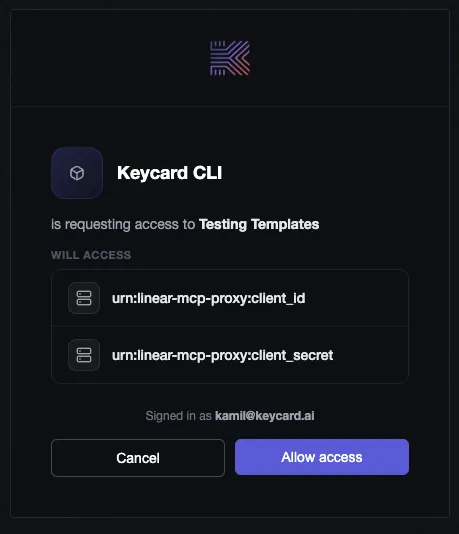
Terminal window cd <project-name>keycard run -- npm startkeycard runinjects short-lived credentials from your Keycard instance at startup. No secrets live in a file. Keep this terminal open.You may see a consent screen like this when the CLI requests access to your application’s credentials:
-
Connect and test
In another terminal, start a new Claude session from the same project directory:
Terminal window keycard run -- claudeYour MCP server is registered but needs you to authenticate before Claude can call its tools on your behalf. Type
/mcpto open the server list, then select your server and complete the login flow:> /mcpLocal MCPs❯ <project-name> · △ needs authenticationSelect the server and authorize in your browser when prompted. You may see a consent screen from Linear that establishes trust between Keycard and Linear:
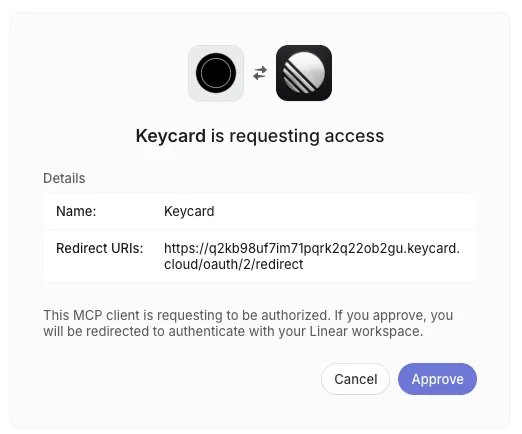
Once connected, you’ll see
✔ connectednext to it.Now try calling a tool:
List my Linear issues.
Each tool call triggers a fresh credential exchange. The upstream token is minted per-request and never stored.
-
Verify in Keycard Console
Open Keycard Console → Audit Log. You should see entries for:
users:authenticateYou logged in successfully users:authorizeYour access was authorized credentials:issueAccess token was issued These entries map directly to the delegation chain described below.
Patterns
Section titled “Patterns”Your server is running. Here’s what Claude set up and why it matters when you build your own servers or debug this one.
Application Authorization
Section titled “Application Authorization”Every request to your MCP server is authenticated before any tool runs. Whether the caller is a human or another agent, the flow is the same.
The Keycard SDK handles the protocol details: advertising how callers should authenticate, validating credentials, and passing the verified identity into your tool handlers.
The audit log entries from step 6 show this in action: users:authenticate confirms the caller’s identity was verified, users:authorize confirms their access was checked against policy.
For the full authorization model, see How Keycard Works.
Application Identity
Section titled “Application Identity”Your MCP server needs its own identity to access upstream resources. Keycard provisions application credentials and stores them on the platform. Nothing lives locally or gets committed to source control.
At startup, keycard run resolves the credentials declared in keycard.toml and injects them into the runtime environment. Your server uses those credentials to authenticate itself to Keycard when requesting resources on behalf of callers.
How credentials are delivered depends on where you’re running. Locally, keycard run pulls them from the Keycard platform. In production, your service needs to authenticate itself. The next guide covers how. See Applications for the full identity and credential model.
Ephemeral Resource Access
Section titled “Ephemeral Resource Access”When a tool call needs to reach an upstream API, your server doesn’t hold a long-lived token. It uses delegated token exchange to get a short-lived, scoped token for that single request.
Keycard
ephemeral credentialThe credentials:issue audit log entry from step 6 is the result of this exchange. Every tool call repeats the same cycle. Nothing is stored. Every access is scoped and logged.
What’s Next
Section titled “What’s Next”Your application is running locally with per-user token exchange. In production, nobody is there to inject credentials at startup, so your application needs to authenticate itself. The next guide covers that:
- Run Apps Without Static Secrets: deploy your service so it authenticates itself, no API keys or .env files
Troubleshooting
Section titled “Troubleshooting”keycard agent api POST returns “Unsupported Media Type” or 400
Provisioning commands run inside a keycard run session can fail with a 400 or "Unsupported Media Type" error.
- Prompt Claude to look up the Keycard API reference and retry the command with the correct invocation.