
Run Apps Without Static Secrets
Deploy services that authenticate themselves without API keys or secrets in environment variables.
Ask Claude to deploy your application to Fly.io. The deployed service identifies itself with a runtime OIDC token – no API keys to store or rotate.
Prerequisites
Section titled “Prerequisites”-
Application running locally from Access APIs on Behalf of Users
-
Fly.io account with
flyctlinstalled (sign up if you don’t have one) -
Your
keycard run -- claudesession should still be running
Walkthrough
Section titled “Walkthrough”-
Ask Claude to deploy
Inside your Keycard session, send a prompt like:
Deploy my MCP server to Fly.io. Read `zone.id` and `org.id` from `keycard.toml` — stop and explain if either is missing. Check that `flyctl` is installed (`command -v flyctl`); if not, install it with `curl -L https://fly.io/install.sh | sh`. Probe `flyctl auth whoami` to check if a deploy credential is wired; if not, stop and tell me to follow https://docs.keycard.ai/platform/concepts/resources/#vaulted-static-credentials to configure a Fly.io org token as a brokered credential, then restart the session. Run `flyctl orgs list` and ask me to confirm the org slug before proceeding.Generate or validate `fly.toml`. Determine the app's port from `.env` (`PORT`), `keycard.toml`, `package.json` scripts, or fall back to `8080`. Align `[http_service].internal_port` to that port. Write `KEYCARD_URL = '<keycard-issuer-url>'` (the Issuer URL from Settings → Connection) into the `[env]` section. Surface `fly.toml` (and `Dockerfile` if generated) before continuing.Provision Keycard primitives idempotently using list-then-create (reuse on 409): (1) Register OIDC provider with name `fly-<fly-org-slug>` and issuer `https://oidc.fly.io/<fly-org-slug>` — the slug must appear in the issuer URL. (2) Look up or create Application with identifier `<project-name>`. (3) Find the zone's `keycard-sts` provider and use its ID as `credential_provider_id` when creating the deployed Resource `https://<project-name>.fly.dev/mcp` with `scopes: ["mcp:tools"]` — omitting `credential_provider_id` causes credential requests to fail with "missing a credential provider". (4) Create Application Credential with `subject: "<fly-org-slug>:<project-name>:*"` — bare `*` accepts any workload from the org.Run `flyctl deploy --remote-only` from the app directory. Verify with `flyctl status` and `curl -sf https://<project-name>.fly.dev/.well-known/oauth-protected-resource` — confirm the `resource` field equals `https://<project-name>.fly.dev/mcp`. Run `claude mcp add --transport http <project-name> https://<project-name>.fly.dev/mcp` to register the production server. Print a summary with the deployed URL, both Resource identifiers (local dev + production), and the registered Provider/Application/Credential IDs. -
Authenticate to Fly.io
The prompt above probes for credentials automatically. If
flyctl auth whoamishows no active credential, Claude stops and walks you through one of the two options below before continuing:Fly.io doesn’t support federated token exchange, so you store a Fly.io deploy token in Keycard as a vaulted static credential. Keycard brokers access without persisting credentials on your machine.
Create a deploy token at fly.io/tokens scoped to your Fly.io organization, then open the Keycard Console link Claude gives you and paste the token under Credentials. Restart your
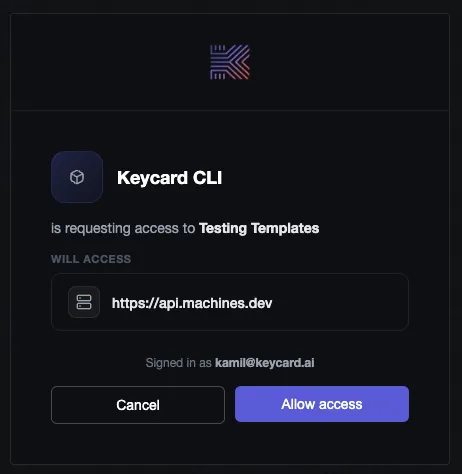
keycard runsession afterward so it picks up the new credential — Claude will tell you when this is necessary and how to resume.The token is encrypted at rest. Claude never sees the raw value; it only receives it through token exchange at deployment time. When Claude needs the token, Keycard shows a consent screen so you can approve before it proceeds:
Run
flyctl auth loginin your terminal. This authenticates your local user to Fly.io, and Claude can useflyctlcommands on your behalf within the Keycard session.Terminal window flyctl auth login -
Claude configures and deploys
Claude generates the Fly.io config, wires up Keycard trust for workload identity, registers the production resource, and deploys the container.
Here’s how the scaffolded code handles credential discovery and workload identity:
// credentials.ts - auto-detects the runtime and picks the right credentialexport function discoverApplicationCredential(options: DiscoverOptions,): ApplicationCredential {const clientId = process.env.KEYCARD_CLIENT_ID;const clientSecret = process.env.KEYCARD_CLIENT_SECRET;if (clientId && clientSecret) {return new ClientSecret(clientId, clientSecret); // local dev via keycard run}if (process.env.FLY_APP_NAME) {return new FlyWorkloadIdentity({ audience: options.zoneUrl }); // production}// ... EKS, web identity, and other runtimes}// credentials.ts - Fly.io OIDC token fetch via the runtime metadata endpointclass FlyWorkloadIdentity implements ApplicationCredential {async prepareTokenExchangeRequest(subjectToken: string, resource: string) {const oidcToken = await this.#getToken(); // fetched from /.fly/apireturn {subjectToken,resource,clientAssertionType: "urn:ietf:params:oauth:client-assertion-type:jwt-bearer",clientAssertion: oidcToken,};}} -
Test the production deployment
Your MCP server is live at
https://<project-name>.fly.dev. Ask Claude to call one of your server’s tools. The same tools that worked locally now run through the deployed server, but the server authenticates with workload identity instead ofkeycard run. -
Verify in Keycard Console
Open Keycard Console > Audit Log. You should see entries for the tool call flowing through your production server:
users:authenticateYou logged in successfully users:authorizeYour access was authorized credentials:issueAccess token was issued Same event types as local development. Authorization and audit don’t change based on where the server runs.
Patterns
Section titled “Patterns”Your service is live with no stored secrets. Here’s what Claude set up and how to apply it to other runtimes.
Workload Identity
Section titled “Workload Identity”Locally, keycard run injects credentials at startup. In production there’s no human present, so the deployed service needs its own identity to authenticate with Keycard and request resources on behalf of callers.
Claude registered a Fly.io OIDC provider in your Keycard instance. When your server starts on Fly.io, it gets an OIDC token from the runtime. Keycard verifies that token against the registered provider and issues credentials – no stored secrets involved.
Keycard
ephemeral credentialThe application credential Claude configured is what ties this together. It specifies which Fly.io workloads can act as your application, scoped to your organization and app name. See Applications for the identity and credential model.
Vaulted Static Credentials
Section titled “Vaulted Static Credentials”Some upstream resources only offer static API keys or long-lived tokens – no ephemeral token exchange. For those, Keycard stores the credential as a vaulted static credential and brokers access through token exchange.
Only use vaulted credentials when native token exchange isn’t available. They have two drawbacks:
- You need to manually rotate the credential in Keycard Console when it expires or gets compromised.
- Every application that requests this resource receives the same static credential, so you can’t scope access per-caller or per-request.
If a resource supports OIDC or OAuth token exchange, use that instead. Ephemeral tokens expire on their own and don’t need rotation.
Production Resource Configuration
Section titled “Production Resource Configuration”Locally, your MCP server’s resource identifier points to localhost. In production, Keycard needs the server’s public URL so callers can find it.
Claude registered a second resource (https://<project-name>.fly.dev/mcp) alongside the existing localhost resource. Both belong to the same application. MCP clients use this identifier to locate your server, and callers authenticate through Keycard, which sends them to the right endpoint.
Both resources are visible in Keycard Console under your application’s resource configuration.
Troubleshooting
Section titled “Troubleshooting”Claude is still calling localhost instead of the deployed URL
After deployment, Claude’s MCP client config may still point to http://localhost:3000/mcp. Ask Claude to update the MCP config to use the new production address (https://<project-name>.fly.dev/mcp), then restart the MCP connection.
Token exchange fails with “provider not found”
Keycard doesn’t recognize the Fly.io OIDC issuer yet. Ask Claude to register the Fly.io OIDC provider, or check Keycard Console > Providers to verify it’s listed.
Deployment succeeds but the server returns 401
The application credential may not match the deployed workload. Verify in Keycard Console > Applications that the credential’s Fly.io app name and organization match your deployment. A mismatch means the runtime OIDC token won’t pass validation.
What’s next
Section titled “What’s next”Your service is running in production with no managed credentials. The next guide covers giving an agent its own access to third-party APIs, with no human in the loop.
- Grant Agent Access to APIs: build an agent that authenticates to external services like Snowflake