
Versions and Rollback
Restore an earlier version of a Policy Set from its history, and how Policies, Policy Versions, Policy Sets, and set versions fit together
Every save or publish records a new Policy Set Version. Rolling back activates an earlier one.
Prerequisites
Section titled “Prerequisites”- The Admin organization Role, or the Manager Role on the Zone (see Roles & Permissions)
- A Policy Set with more than one version
Roll back
Section titled “Roll back”-
Open the set’s history
In Keycard Console, open Policies, click the Policy Set, and select the History tab in the right-hand panel. Versions are listed newest first, with who saved each one and when. The one currently deployed carries an Active badge.
-
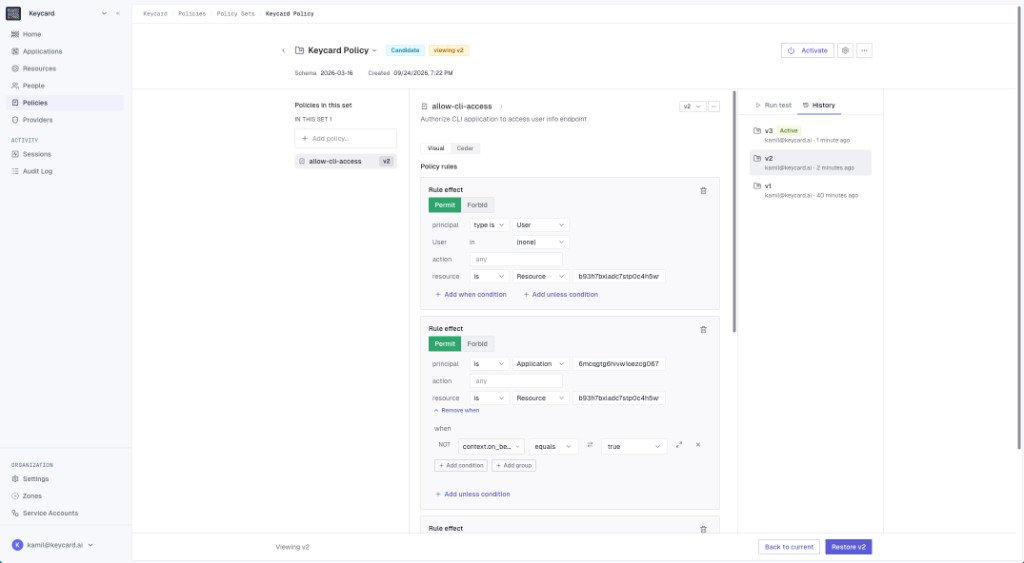
Pick the version to restore
Click a version to preview it. The header shows viewing v2 (or whichever you picked) and the editor switches to read-only, showing the rules that version contained.
-
Restore it
Click Restore v2 in the footer and confirm. Keycard activates that version for the Zone, which takes effect immediately. No new version is created; v2 simply becomes active again, and v3 stays in the history. To leave without changing anything, click Back to current.
Verify
Section titled “Verify”Open Policies → Activity. A Policy Set Version Activated event naming the restored version should be at the top. Run the affected Application once more to confirm the earlier behavior is back.
Roll back to the defaults
Section titled “Roll back to the defaults”To return to Keycard’s managed Policies, open default-zone-policies from the Policy Sets list and click Activate.
How versions work
Section titled “How versions work”You edit a Policy, publish, and activate. Every edit becomes an immutable version and every publish becomes an immutable manifest, which is what makes rollback a matter of re-activating something that already exists.
| Console term | API object | What it is |
|---|---|---|
| Policy | policy | A named container. Its rules live in versions. |
Policy v1, v2, … | policy_version | Immutable Cedar content, validated against a schema version |
| Policy Set | policy_set | A named deployment unit for the Zone |
Set v1, v2, … (in History) | policy_set_version | An immutable manifest pinning exact Policy Version IDs. Exactly one is active per Zone. |
Policies
Section titled “Policies”A Policy is a named container for authorization rules. It has metadata (name, description) but no Cedar content.
- Policy names are unique within a Zone.
- Metadata can be updated at any time without affecting active authorization.
- Deleting a Policy archives it. It stays in the history.
- Platform-owned Policies can’t be updated or archived by customers.
Policy Versions
Section titled “Policy Versions”A Policy Version is an immutable snapshot of Cedar content, validated against a specific schema version.
- The Cedar content and schema reference never change after creation. To change a rule, create a new version.
- A version can be archived only if no active Policy Set references it.
- Version numbers auto-increment within each Policy.
Policy Sets
Section titled “Policy Sets”A Policy Set is a named deployment unit that bundles Policies. Like a Policy, it has metadata but no content of its own.
- Policy Set names are unique within a Zone.
- Platform-owned Policy Sets can’t be updated or archived by customers.
- A Policy Set can’t be archived while it has an active binding.
Policy Set Versions
Section titled “Policy Set Versions”A Policy Set Version is an immutable manifest that pins exact Policy Version IDs. When a version is active, Keycard evaluates exactly the Policies listed in its manifest and nothing else.
- The manifest can’t change after creation and must contain at least one entry.
- Each entry references a Policy ID and Policy Version ID, both of which must exist and not be archived.
- A version can be archived only if it isn’t the currently active one.
- Activating a version atomically replaces the previously active version.
- Version numbers auto-increment within each Policy Set.
Pinning applies to managed Policies too. When Keycard updates a managed Policy it issues a new version rather than changing the existing one, so an updated managed Policy does not reach your set until you create a new set version that adopts it.
Authoring versus activation
Section titled “Authoring versus activation”Authoring is separate from activation. Creating Policy Versions and Policy Set Versions has no effect on live traffic. In the Console this is the difference between a Candidate set and an Active set: nothing changes until you click Activate. The one exception is editing a set that is already active, where saving deploys the new version immediately, which is why the Console asks you to confirm Save and deploy.
Troubleshooting
Section titled “Troubleshooting”- The version I want is not listed. Only versions of this set are shown. If the rules lived in a different set, open that set and activate its version instead.
- Restore is disabled. You are viewing the version that is already active, or you don’t have permission to activate. Pick another version, or click Back to current.