
Troubleshooting
Read a policy denial from the browser, the Console, the token endpoint, and the audit log, and work out which rule to change
Testing tells you what a Policy will do. A live request tells you what it did. Under a custom Policy Set, a denial almost always means no rule permits this actor to reach this Resource, and the job is to find out which actor and which Resource.
The Access denied page
Section titled “The Access denied page”When a User signs in through the browser and policy denies the request, Keycard shows an Access denied page instead of the consent screen. It names the Application, the User it is acting for, and the Resource that was denied.
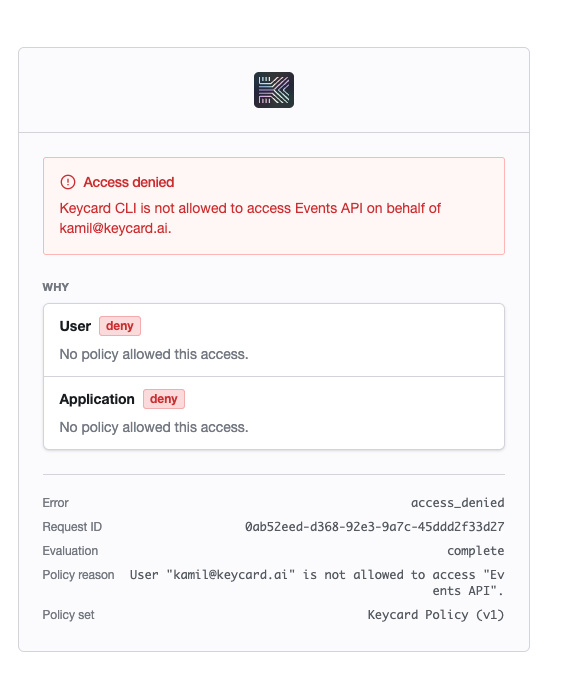
The Why panel splits the verdict the same way Run test does: one verdict for the User, one for the Application. If only one reads deny, that is the rule you are missing. The footer carries the Request ID and the Policy set and version that made the decision.
Activity
Section titled “Activity”Every live evaluation is recorded as a Policy Evaluated event under Policies → Activity; denials are marked in red. Click one to open it.
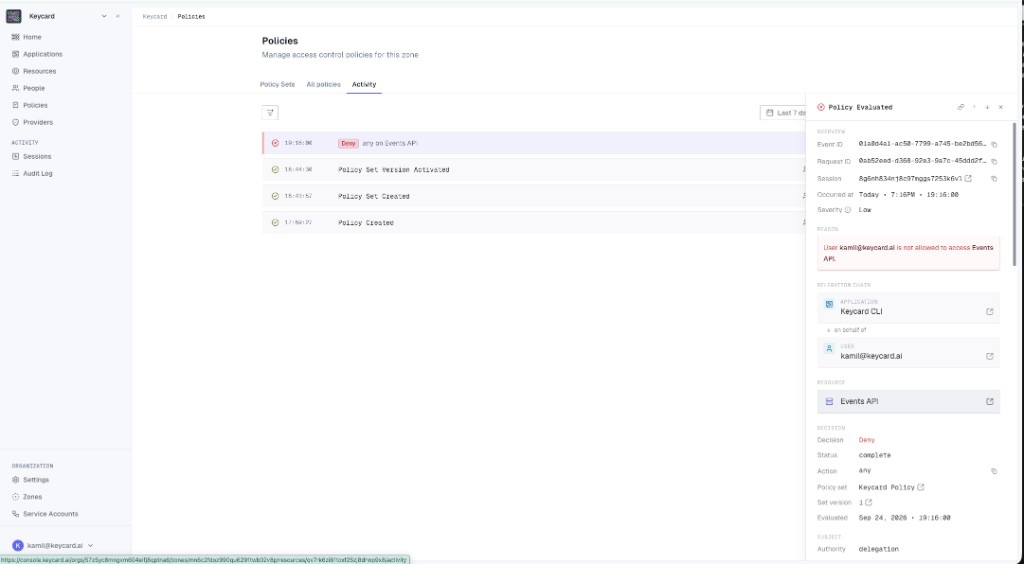
The panel shows the delegation chain (which Application, on behalf of which User), the Resource with a link to its detail page, the Decision, and the Policy set and Set version that were active. Reproduce the event in Run test by picking the same Actor, Subject, and Resource against that set version, then change the rule and run again until it allows. Run test itself never appears in Activity.
The token endpoint
Section titled “The token endpoint”When an Application exchanges a token rather than a User signing in, the denial arrives in the token response. The shape depends on whether the blocked Resource is the primary Resource of the request or a dependency.
| Hard denial | Soft denial (dependency) | |
|---|---|---|
| What is blocked | The primary Resource in the token request | A dependency Resource (a secondary API the primary one relies on) |
| HTTP response | access_denied error, no token issued | HTTP 200, token issued |
| Signal | error and error_description in the response body | The denied Resource is missing from the token’s target claim |
A hard denial names the Resource and, when a forbid rule decided the outcome, the Policy and Policy Set Version it belongs to. A default deny names no Policy. The requestId in the response body correlates it with the audit event.
A soft denial is a normal success response. The only signal is that the target claim of the access token lists fewer Resources than you requested: decode the token and compare the two lists.
If you use the MCP SDK, hard denials surface as AccessContext errors. For soft denials, the Python SDK exposes get_successful_resources() and get_failed_resources() on AccessContext; the TypeScript and Go SDKs don’t enumerate Resources yet, so compare the target claim yourself.
The audit event
Section titled “The audit event”Each live decision is a policies:evaluate audit event. Filter the Audit Log by the requestId from the error response or the denial page to find it. The event carries:
- request_id, correlating the decision with the originating request
- decision:
allowordeny - determining_policies: the Policy IDs that produced the outcome; empty on a default deny
- policy_set_id and policy_set_version_id: the exact set version that was evaluated
- evaluation_status:
complete, orpartialif some Policies failed to evaluate - diagnostics:
{policy_id, message}entries for evaluation errors or warnings
Keycard never logs Cedar source (only SHA-256 hashes of policy content), entity attributes such as email or scopes, or JWT claims. Audit emission failures never block authorization decisions. Policy management operations emit their own events, listed in the Activity Events registry, and the whole log can be shipped to your own bucket with Audit Log Export.
Run test
Section titled “Run test”- Run test returns Deny but the rules look right. Check which half failed. The User check needs a rule whose principal matches a User; the Application check needs a rule whose principal matches the Application, and
on_behalfconditions only hold when User context is on and a Subject is set. - Run is disabled. Actor, Action, and Resource are all required. On a Policy page the panel only shows in Visual mode; fix any Cedar validation errors and switch back.
- Determining policies is empty on Deny. No
permitmatched and noforbidfired. Add a permit for the Actor, Action, and Resource shown in the panel.